
Assignments
- Engagement
10% - DevLogs
20% - Git Milestones
5% - Javascript Proficiency
10%
- Final project
- Concept
5% - Proposal
10% - Prototype
10% - Design
10% - Deliverables
30%
- Concept
DevLogs
Section titled “DevLogs”Throughout this course you will write about and document what you learn, adding text, images, and other media to reinforce concepts from the course. Describing new materials in your own words not only increases learning, but allows you to track your progress, debug and share your design and technical solutions, and lets you refer back to this material after this semester. See the Schedule for setup and list of DevLogs, and follow these tips:
- Add text, images, videos, links to tutorials, code, examples, etc.
- Use
.mdor.mdxfiles to add rich text formatting and improve readability. - Name the files appropriately (e.g.
devlog-2-1.mdx) to make them easy to find. - Update and commit your work often so we can refer to it in class.
- Post in Moodle a direct link to the file where prompted.
- The deadlines are listed in the schedule.
📚 Reading Responses
Section titled “📚 Reading Responses”Use the following outline when the DevLogs ask for a reading response. Links and references should be properly cited using a style of your choice.
- A summary of the content
- 1 quote from the content
- 1 related comment on the content
- 1 related discussion question (a prompt you would like to explore in class)
- Share a related work of art, design, or technology that relates to the text(s) and reflect it is so.
Git Milestones
Section titled “Git Milestones”Git and Github are essential in this class. Post a link to your finished (parts 1 and 2) Git Milestones repo in Moodle. If you have completed these previously then you can link to your finished repo.
Javascript Proficiency
Section titled “Javascript Proficiency”Javascript coding is essential in this class. Complete all Codecademy sections in the following lessons and post a screenshot showing your completion to Moodle.
- Learn JavaScript - Conditionals, Functions, Scope, Arrays, Loops, Iterators, Objects
- Learn JavaScript: Asynchronous Programming - Promises, Async-Await
- Learn Node.js - Back-End, JSON, Intro to Node.js, events, errors, fs, HTTP request/response
Final Project
Section titled “Final Project”Technology has always been complicated. It embodies the dreams as much as the failures of our species. It accelerates the possibility we might improve and ease the burdens of humankind, yet continues to allow us to cause harm and inequality. The tech that Facebook creates is considered innovative, not because it makes the world better, safer, or more humane, but due to its ability to capture and sell attention, manipulate populations, and generate massive wealth for a few individuals.
Recall however, technology is not only not neutral, it is also not yet self-deterministic. The messiness of technology mirrors our own possibilities and biases. The definition of “new” has equal subjectivity. The invention of the wheel was surely a hit at its “launch party” for allowing humans unprecedented mobility. Yet, like many other innovations, it contributes towards accelerating our destruction of the natural world.
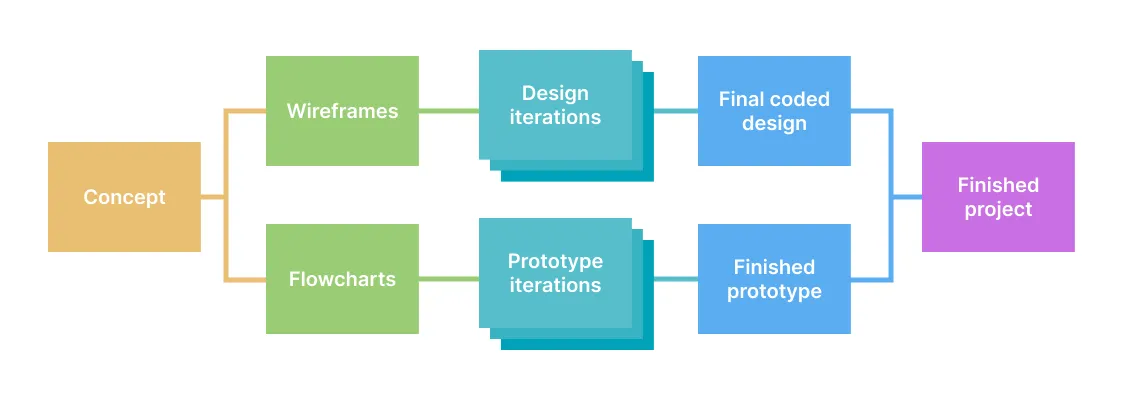
At the outcome, you will have developed your concept, incorporating knowledge from the course to research, ideate, prototype, test, build and deploy a “thing”, and importantly, describe your motivations, inspiration, process through an accompanying statement and documentation.
1-Concept
Section titled “1-Concept”Identify a topic, collect research, prepare a summary for a brainstorming session.
- Identify potential topics to explore. It shouldn’t be too specific, nor too broad. Is there a specific problem you want to solve? Or do you wish to address issues by problematizing your subject? (2-3 sentences)
- Collect research (1-2 related articles, with summaries) and examples (3 links with summaries of inspiring / related projects). See the Critical Web Design Index for inspiration.
- Identify new skills or technologies (e.g. a design method, programming pattern, code library, etc.) you are interested to learn and could potentially use in your project.
- Write a summary of your topic(s), research, and technology (3–4 sentences). Address why you are drawn to this topic and why it is important to explore. Identify the communities, resources, and issues involved. What frameworks or methodologies might you use?
- Use this idea generator generator to spark a perspective you’ve never considered:
- Bring the above to class for the…
In-class activity (disney creative strategy)
In groups, brainstorm on your topic(s) use the Disney Creative Strategy, which asks your group to assume different “hats” in order to ideate on concepts, solutions, and risks.
- Everyone: post your subject or concept in Slack
- As Dreamers, add new ideas for projects based on the subject to the posts in your group
- How might you create something that helps others discuss, think about, or help to solve the issue?
- The more ideas the better. Brainstorming aims to produce quantity, from which we select quality ideas.
- No criticism. Our goal is to generate a pool of ideas. All ideas are welcome.
- As Realists, after all have posted, talk about each in a group
- Think more practically, about how you would put the ideas into practice.
- After the session, explore the ideas and notes as a critic, to figure out what you can build in the given time
2-Proposal
Section titled “2-Proposal”Create a pitch deck (10-15 slide Google Presentation)* to share and plan your project that contains:
- A one paragraph introduction to your concept and what you plan to make.
- Audience - Who will use this and why? Write a user story describing their goals.
- An initial attempt at an identity (e.g. a logo, word mark, style guide, etc.).
- Competition Scan - Examples (2–3) of similar works (in concept or tech) with images and links.
- Flowcharts (2–3) showing each step users see, and another showing how data works in the app
- Wireframes showing all the views in the interface (introduction page, forms, results page)
- Technology - Include pseudocode of the main logic of your project. List technologies and demos you think you will need. List the “unknowns”—parts of your idea that you don’t know yet how to execute.
- Does your project use data? What potential sources will you use?
In-class activity (known unknowns)
Known Unknowns
Section titled “Known Unknowns”- In Slack or one by one as a class, share an unknown or concern about your final project. (e.g. “How best (considering time, cost, etc.) to integrate an LLM into a web app?”)
- Review others’ posts.
- On posts where you have experience or comments, add a helpful suggestion.
In-class activity (lightening talks)
Lightning talks of your pitches
Section titled “Lightning talks of your pitches”- Share a link to your proposal in Slack.
- Present slides on Zoom. 3 minutes max.
- 1 minute max for questions / comments. Add others in Slack thread.
In-class activity (speed dating)
Speed Dating
Section titled “Speed Dating”- Find a partner.
- Share your proposal, progress, and unknowns. (3 min)
- Your partner should ask questions and make comments while you make notes. (1 min)
- Switch roles and repeat the above.
- Switch partners and repeat.
3-Prototype
Section titled “3-Prototype”Create a working “proof of concept” of your app.
- Identify the functionality that proves your concept is feasible. IOW, what aspect(s)of your project must work to make this possible?
- Post a visual to describe your prototype. This could be a flowchart, UI design, or any other graphic or video to help describe functional prototype.
- Describe the concept of “separation of concerns” in your own words using your own project as an example. For example, what is your strategy to keep your prototype work focused and free from non-essential code?
- What did you struggle with to finish the proof of concept?
- List the most helpful website, tutorial, etc. you used to complete your prototype?
- What is the
1stmost important feature you will implement (once the prototype is done)? - What is the
2ndmost important feature you will implement (after the above)? - What is the
3ndmost important feature you will implement (after the above)?
In-class activity (identify “POC”)
- One person will post their pitch in Slack
- Independently, everyone will read their pitch
- Discuss:
- What is the one essential component of this project that must be completed?
- What are two things that can be completed after the prototype is finished?
- Move to the next person in the group
In-class activity (prototype feedback)
In groups, share your prototypes to get feedback:
- Be ready to explain the current status of your work.
- Bring specific questions or unknowns (concept, design, tech) you would like to discuss with your group.
4-Design
Section titled “4-Design”Design a series of layouts to previsualize aspects of your UI design, branding, etc.
- Research and collect relevant examples (in terms of style, content, interaction, etc.) into a moodboard and note how others have designed solutions to represent similar information and/or design problems.
- Start with wireframes to represent the main content area(s) / view(s) of your project.
- Create 4-5 design iterations with Figma.
- Use grid-based design by incorporating a Bootstrap or Tailwind template.
- Show your work! Do not delete previous versions—we want to see your progress as you iterate and improve your designs.
- Create multiple iterations of each different page / view your app.
- Create a new moodboard of relevant examples of good design to help you improve your own. See this DIG 245 presentation for more.
- Show experimentation in your iterations. Refrain from using AI-generated logos, icons, images, etc. An important part of a design practice includes creating the ideas for these things and producing them yourself. At the very least, consider using royalty free images created by actual humans from thenounproject.com or unsplash.com instead of using whatever AI barfs up.
In-class activity (design critiques)
Share your iterations to get feedback before coding the final design.
- Bring to class: What are three questions you would like to ask each user of your potential design?
- In-class: Design Critique: Imaginary Audience
5-Design + Prototype
Section titled “5-Design + Prototype”- Combine your coded design and prototype
- Your project should be 95% complete
In-class activity
- Make sure your project is live and ready to share. Post a link to it and Figma in Slack.
- Share your project in a small group (watch other use it, get specific feedback)
- Then, we’ll go around the room and those who wish can share with the whole class in a lightning talks (3 min.) format.
6-Deliverables
Section titled “6-Deliverables”Your finished project should include:
- The Project
- Your coded design (valid HTML and CSS (?)) combined with your prototype in a final application.
- About page: A well-designed, but simple page that contextualizes your project. It could appear as an introduction to the project or provided at the end to explain what happened.
- The project should be live, hosted on Github Pages, Davidson Domains, or some other server.
- Documentation
- A Google Presentation (update your original proposal with screenshots, text, flowcharts, etc.) to document and share your finished project.
- A screencast video taken on your computer (do not use a cell phone!) (1:30 max) to demonstrate how your project works (see tips)
- A 200–300 word statement explaining your concept and execution. This can be posted in Moodle, or included somehow in the actual project (e.g. the Intro page).
- A link to (all of) your Figma layouts
- Moodle Post
- When finished, push, publish, and post all deliverables to Moodle per documentation in the Assignments.