

Web Development Tools
Learning Objectives
- Compare popular web browsers by browser market share
- List essential tools for frontend web development and describe their purpose
- Demonstrate how to install and configure software for a web development environment
Contents
Section titled “Contents”Get ready for this course. Install / create accounts:
- Slack - communication
- Command line - basic computing
- Sites folder - where you’ll keep all your projects for the class
- Visual Editor - design
- Web Browsers - to test your web pages
- Code Editors - to build
- Version Control - to access class demos, manage code versions, and turn in assignments
- Class communication will happen via Slack.
- 👉 Download the desktop and mobile app and enable notifications.
- Watch for an invitation to join the class Slack.
Command line
Section titled “Command line”- The command line allows you to control your computer via a text interface.
- 👉 Complete the command line crash course before proceeding.
Sites folder
Section titled “Sites folder”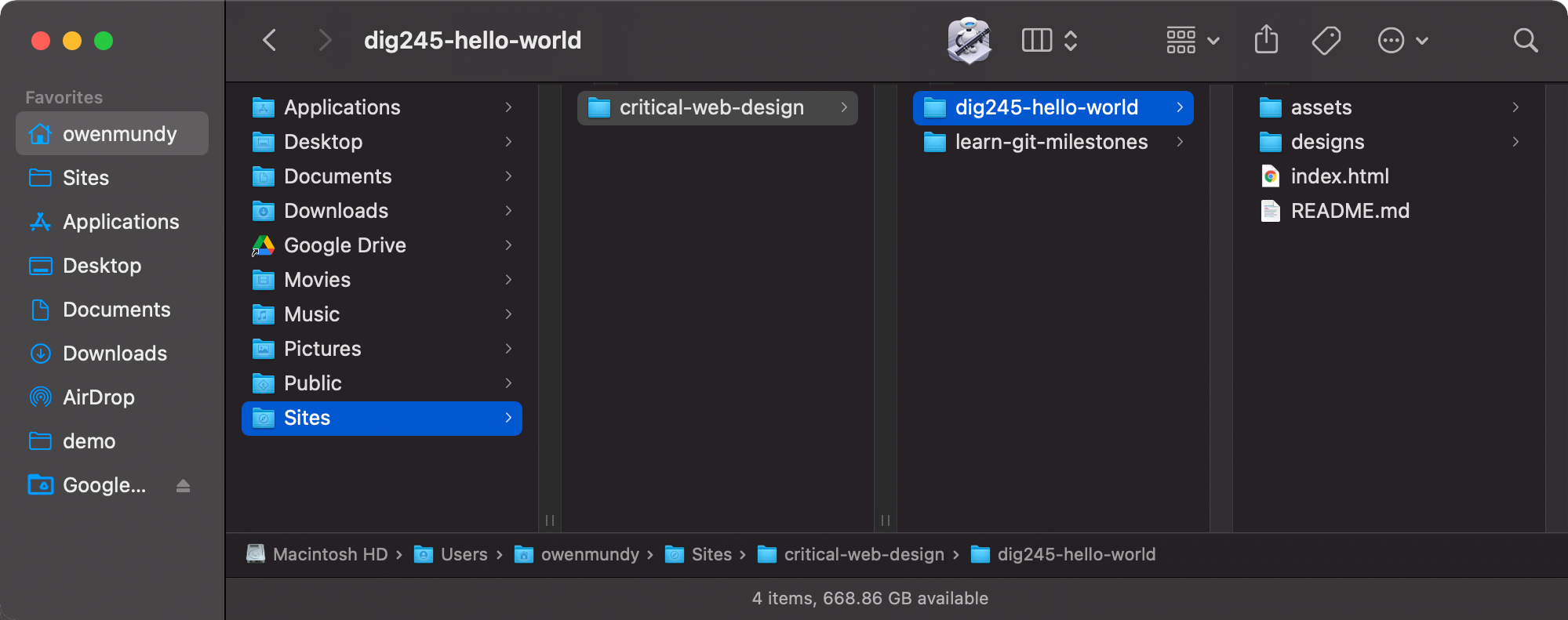
👉 Follow these steps to create a Sites folder for all your class projects and demos.
- Go to your home folder. The path (depending on your OS) is:
- Mac:
/Users/<yourusername>/ - Windows:
C:\Users\<yourusername>\
- Mac:
- Create a new folder in your
homecalled Sites (yes, uppercase S). The path will be:- Mac:
/Users/<yourusername>/Sites/ - Windows:
C:\Users\<yourusername>\Sites\
- Mac:
- Create a new folder in Sites called
critical-web-design. The path will be:- Mac:
/Users/<yourusername>/Sites/critical-web-design/ - Windows:
C:\Users\<yourusername>\Sites\critical-web-design\
- Mac:
Visual Editor
Section titled “Visual Editor”Designing websites requires a visual editor:
- Good design requires multiple iterations. A visual editor lets you compare and improve on previous versions of a design.
- Coding is slow. When you design you need to make and quickly judge many visual changes. With a design tool you can pre-visualize the layout before you code.
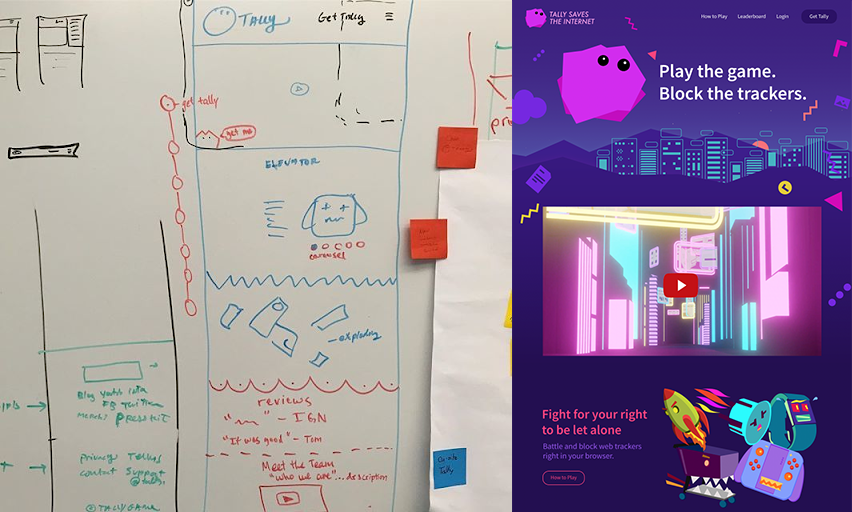
- Start new designs with pencil and paper or a whiteboard to create wireframes. Then transition to Figma to complete detailed versions of your design that exactly match (color, resolution, graphics) what you will code. You can even prototype your projects, adding animation and interaction to see how the user experience feels.
👉 Create a free Figma account and start experimenting!
Product comparison
Section titled “Product comparison”| Product | Cost | Description | Cons |
|---|---|---|---|
 Figma Figma |
free | Widely used to layout, illustrate, animate, and prototype websites and apps. | ? |
| Photoshop | $$$ | Industry standard, uses pixels, capable of web design and much more. | Expensive. Large learning curve. |
| Illustrator | $$$ | Excellent at vector graphics, therefore should only be used for illustration and print work. | Expensive. Large learning |
| Gimp | free | Open source Photoshop alternative. Opens PSDs. Tutorials available. | Interface can feel clunky. Not widely used. |
Web Browsers
Section titled “Web Browsers”A web browser is more than the software you use to access data on the internet. Browsers manage requests for hundreds of remote files on web servers, combine and render response data as media-rich “web pages”, and make them interactive to provide the essential hyperlink (1965) function that “connects” information on the internet.
Request > Response
Section titled “Request > Response”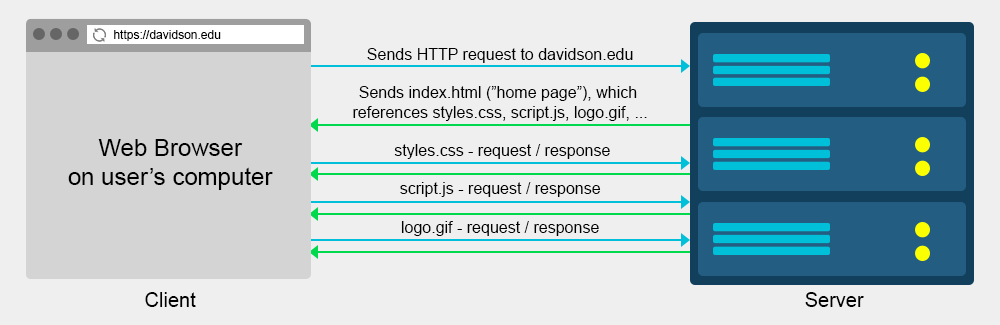
For every page visited:
- A user clicks on a link on a page in the browser
- The browser requests the new page from that website server (the computer where the files are stored)
- The browser receives a response, and requests all other content (stylesheets, scripts, images, etc) for the page
- Finally, the browser renders the all this content on a user’s device and they continue the process.
The Browser Wars
Section titled “The Browser Wars”Browsers are not all created the same. Some only run on desktop or mobile. Others only run on specific operating systems. There are big differences in how browsers follow (or not!) the WC3 standards when they render the pages you build. Even the browser versions can be quite distinct. Ask any veteran web developer what it was like to work around the bugs on Internet Explorer 6!
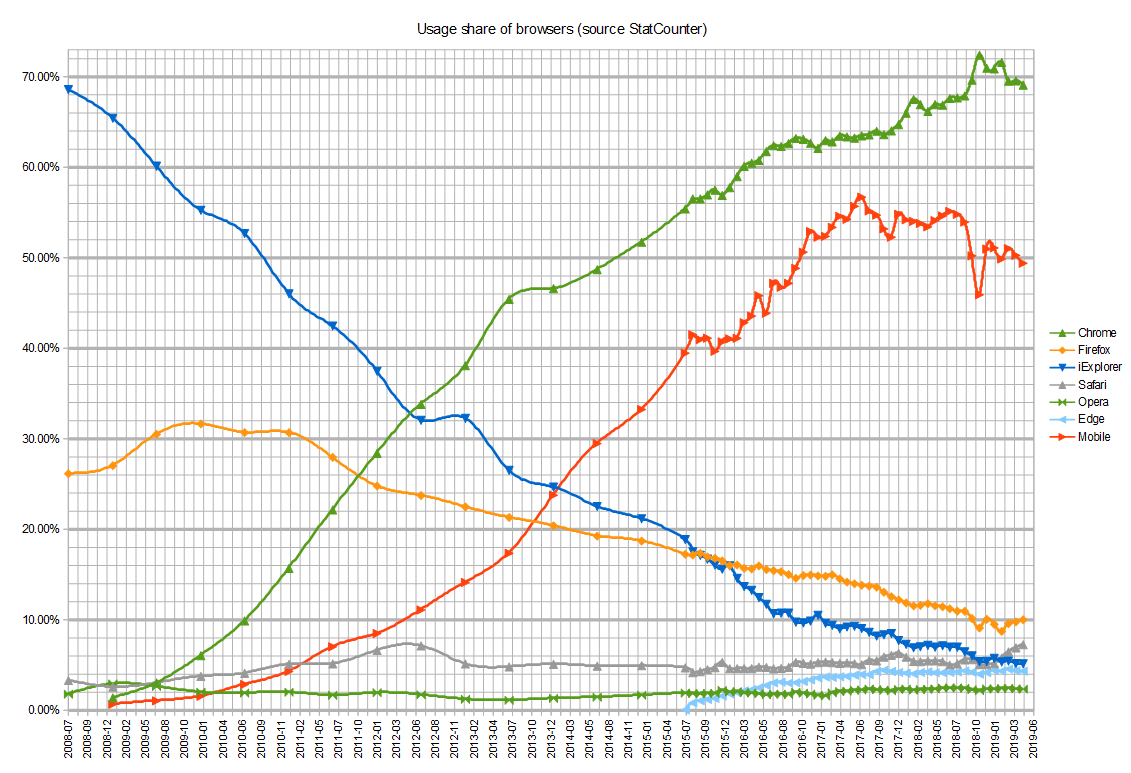 Graphic depicting usage share during the 2nd browser wars (2008–)
Since the browser is the primary vehicle through which users will encounter your web pages, it follows that it is essential to test your coded pages in the same environment. It would be overwhelming to test every page in all the different browsers, operating systems, and display sizes that are available, but lucky for us, some browsers are more popular than others.
👉 Discussion
Section titled “👉 Discussion”With your group, examine the following table containing usage share on all (desktop and mobile) browsers:
- What do you notice?
- Based on this data, what do you think the three most important browsers are to install and use in testing?
| Browser | StatCounter 8/2021 | Wikimedia 11/2019 | Platform(s) |
|---|---|---|---|
 Google Chrome* Google Chrome* |
65.1% | 48.7% | Windows, MacOS, iOS, Linux |
 Safari Browser Safari Browser |
18.6% | 22.0% | MacOS & iOS only 😢 |
 Firefox Browser Firefox Browser |
3.4% | 4.9% | Windows, MacOS, iOS, Linux |
 Microsoft Edge* Microsoft Edge* |
3.4% | 1.9% | Windows, MacOS |
 Samsung Internet* Samsung Internet* |
3.1% | 2.7% | Android & Tizen only 😢 |
 Opera Browser* Opera Browser* |
2.1% | 1.1% | Windows, MacOS, iOS, Linux |
 Internet Explorer Internet Explorer |
0.6% | 3.9% | Windows only 😢 |
| Others | 4.6% | 14.5% | — |
 Chromium like
  Brave. (logos)
Next, compare the data from the Wikipedia browser usage share article, the StatCounter, and Wikimedia.
- What do you notice now?
- Did your top three browsers change?
Click to learn which browsers you should install
Recommendation
Section titled “Recommendation”Did you guess, “I should install all of them?” That’s not an incorrect answer. Two important things to learn from the above:
- 50% of all users are now mobile users. This affects not only the browsers you test on but how you accommodate different display resolutions and devices.
- And, Chrome is a clone, but it is far and wide the most popular iteration of the Chromium browser.
- 👉 Install Chrome and Firefox
Code Editors
Section titled “Code Editors”Source-code editors are text editors designed for writing source code. They might be standalone programs, or run in an integrated development environment (IDE) or a web browser. There are many great source code editors, many of which are multi-platform, free, and highly capable. Here are a few that I have found useful:
- VS Code
- Sublime text
Atom EditorPulsar- Komodo Edit
Install and Configure VS Code
Section titled “Install and Configure VS Code”
VS (“Visual Studio”) Code is a free source code editor for macOS, Linux, and Windows. It has support for extensions to add functionality to the editor and embedded Git controls. VS Code is developed Microsoft.
👉 Download and install VS Code then follow the tips below.
- Mac and Windows installation
- MacOS: Enable command line launching (e.g.
code .to open a project) - Install open in browser extension to open a page in your default web browser
- Review these introductions on the user interface and HTML support

Atom was a free and open-source source code editor for macOS, Linux, and Windows. Built by GitHub using the Electron framework, it supported plug-ins written in JavaScript, embedded Git controls, and more. Fans for Atom should migrate to the open source fork called Pulsar
Version Control
Section titled “Version Control”We will be using Git and Github Desktop for version control, demos, turning in assignments, and collaboration.
👉 Review the Git & Github Desktop slides
Advanced Web Development Environment
Section titled “Advanced Web Development Environment”Tools for full-stack web development.
So you’re already familiar with standard front-end web development and ready to try full-stack?
- NVM, NPM, Node.js
- Homebrew
- NVM/Node
- SFTP (Secure File Transfer Protocol) clients make it easy to transfer files between computers using a GUI.
- Cyberduck or FileZilla (Windows, MacOS, Linux)
- remote-ftp - Enable browsing remote SFTP just like the built-in Tree View
- Databases
- Productivity
- Browser extensions
- Markdown Viewer let’s you preview
.mdfiles in your browser so you can work on your README files locally. - JSON Formatter will highlight and format JSON in the browser to help you analyze and work with it.
- Adblock Plus will help you preserve your sanity (and maybe your privacy) while working online.
- https://builtwith.com/
- Markdown Viewer let’s you preview